Your company’s standards, in every AI session your team runs.
With Required context, a Context Authority sets the rules, references, and skills every Claude Code session in your company runs under. Praxix applies them automatically. Nobody opts out, nobody quietly edits them, and every change is on the record.
Standards your team can’t forget, skip, or quietly rewrite.
Shared skills are optional — an engineer chooses when to load them. Some standards shouldn’t be optional: your security checks, your release process, the rules for code the AI writes on your behalf. Required context makes them apply everywhere, without relying on every engineer to remember.
Applied to every session
A Required item loads into every session in your team’s company automatically, each time the session starts. Scope it company-wide, or to a single repository — Praxix recognizes a repo by where it pushes, so a clone in a different folder still matches.
Locked with a passphrase we never store
Only a Context Authority holding an item’s passphrase can edit it. Members and Context Creators cannot edit, remove, or deselect it. Praxix never stores or sends the passphrase — not on your machines, not on our servers, not even as a hash.
Every change on the record
Every control action is written to the item’s history and emailed to the Team Owner and every Context Authority — there is no setting that turns that off. Anyone on the team can open an item’s history right where it appears in a session.
Sessions remember what governed them
A finished session shows the Required rules it ran under, with the version in force at the time — not today’s rules. When someone asks why the AI did what it did, the answer is on the record.
REQUIRED BY YOUR TEAM · 3
- Meridian code standards[i]rule · company
- 02/09/26 — sam@meridian.example asked for a change
- 03/09/26 — dana@meridian.example handed control over (sam@meridian.example)
- 03/09/26 — sam@meridian.example set a new passphrase
- Security review checklistskill · company
- Firmware release processreference · repo: firmware
Set by your team’s Context Authorities. Ask the agent to recite it.
Built for the day someone leaves.
A passphrase nobody stores raises a fair question: what happens when the person who set it is gone? Nobody can simply reset it. Control moves through three steps instead, and every one of them is announced.
- 1
A Context Authority asks
From inside Praxix, they raise a request for control of the item. It notifies the Team Owner and every Context Authority — and grants nothing on its own.
- 2
The Team Owner decides
From the Teams dashboard, the owner hands control to another Context Authority, suspends the item while it’s sorted out, or retires it. Through a hand-over the item keeps applying to every session; only editing pauses until the new holder sets a passphrase.
- 3
Praxix steps in only when asked
If the Team Owner asks, or has genuinely left the company, Praxix support can hand control to one of your existing Context Authorities — never on a timer, never to anyone else. The action appears in the item’s history on your dashboard, naming the person at Praxix who did it and who at your company asked.
An override you can’t see would be a backdoor. Every support action shows up on your own dashboard, and the content of your standards stays encrypted to your team throughout.
What Required context is — and isn’t
It protects a standard from being changed, not from being read. Members see a Required item’s name, and the agent will recite its content if asked. It is a strong instruction the agent is told to put first, not a policy engine, and it applies to sessions run in Praxix. We’d rather you know that before you buy than after.
Turn one engineer’s best context into a team standard.
Praxix Teams turns individual AI expertise into reusable organizational context.
Your engineers may work in the same repositories and follow the same development processes, but their AI agents do not automatically share what each engineer has learned.
One developer creates a carefully tested skill with every required safeguard. Another builds a similar workflow with different assumptions. Both may reach the same result, but the organization has no consistent way to preserve the better approach and make it available to everyone.
Fifteen engineers should not have to teach Claude Code the same lesson fifteen different ways. Praxix Teams changes that.
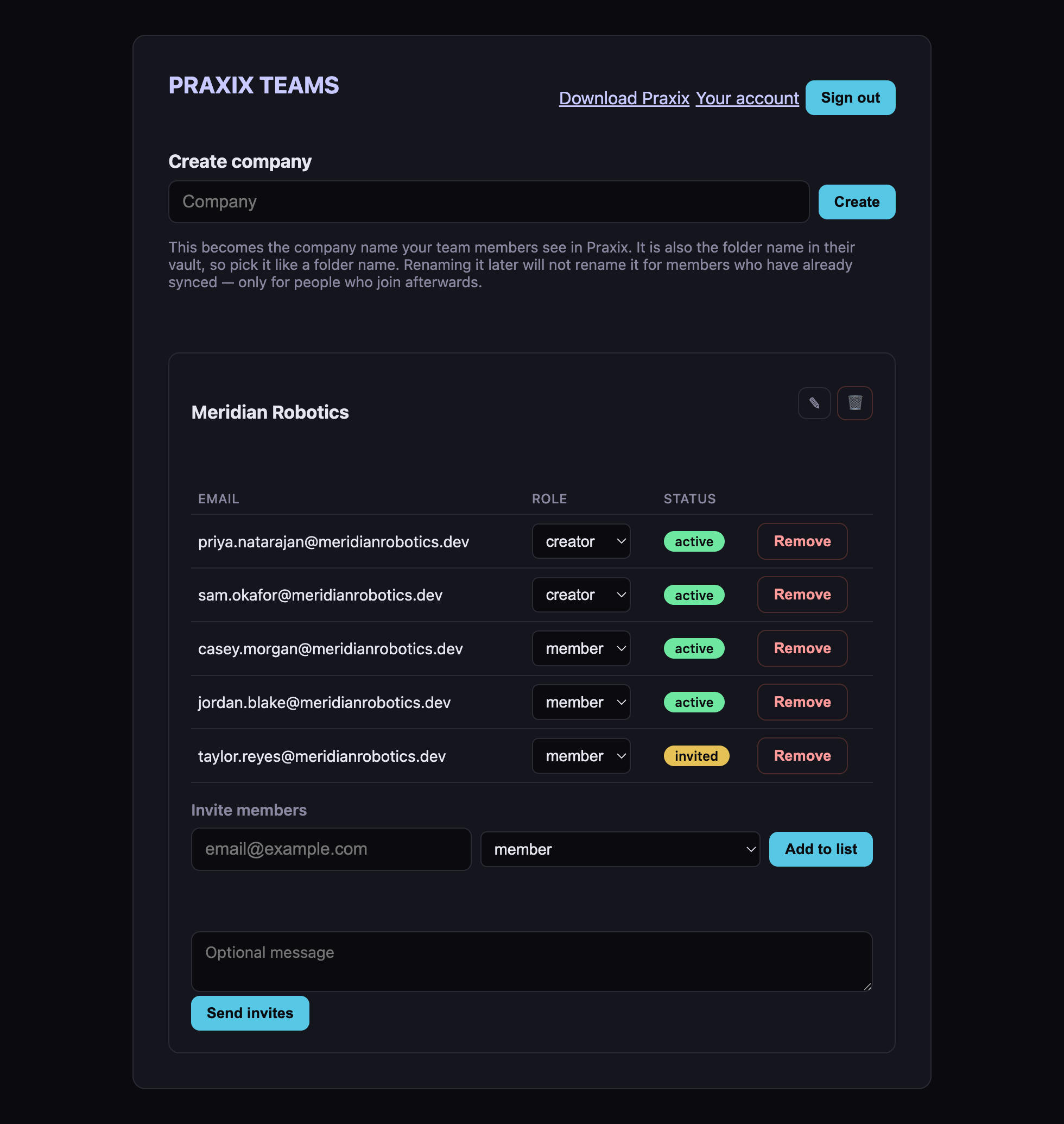
The Teams Dashboard — companies, members, roles, and invites in one place.
Create a team for your organization, invite members by email, and designate the people trusted to create shared context. Context Creators can build and publish shared skills, rules, and references directly from Praxix. Published resources are distributed to the team and imported into each member’s local Praxix library the next time the application starts — or whenever they choose to sync.
One engineer does the work of capturing the knowledge. Every authorized engineer gains the ability to use it.
Define how your organization works — once.
Share the context behind the work your team performs repeatedly:
- Branching and pull-request workflows
- Code-review standards
- Testing and quality requirements
- Database development practices
- Security checks
- Release and production-promotion processes
- Architecture conventions
- Incident-response procedures
- Repository-specific knowledge
Team members can inject that shared context whenever the task requires it, giving Claude Code the same organizational knowledge regardless of which engineer launches the session.
From one engineer’s know-how to everyone’s session.
- 1
A Context Creator builds “Feature Development”
- 2
Adds branching, review, testing, and release standards
- 3
Publishes it to the organization
- 4
The team receives it automatically at launch or by syncing
- 5
Every engineer can inject the same shared context
Praxix does not merely store internal documentation — it places that documentation inside the agent’s working context at the moment it becomes useful.
Built around real organizational boundaries.
A Praxix team is also represented as a company inside the application. The repositories, projects, resources, and sessions associated with that organization remain clearly separated from the rest of each engineer’s work.
Team owners manage membership and roles. Context Authorities set the standards every session runs under. Context Creators publish shared knowledge. Members receive and use the resources appropriate to their work.
| Role | Responsibility |
|---|---|
| Owner | Creates the company, buys and assigns seats, manages membership, and sets roles from the Teams dashboard. Holds the controls for Required context: hand control over, suspend, restore, or retire an item. |
| Context Authority | Everything a Context Creator does, plus setting the team’s Required context — the standards every session runs under — and editing the items whose passphrase they hold. |
| Context Creator | Builds and publishes the team’s shared skills, rules, and references directly from Praxix. |
| Member | Receives the published resources in their local library and injects them into Claude Code sessions. Required context applies to their sessions automatically. |
End-to-end encrypted. We couldn’t read it if we wanted to.
Published team content is sealed on the creator’s machine before it ever leaves. Our servers store and relay only ciphertext they cannot open. The keys exist in exactly one kind of place: your team members’ own machines. When someone leaves the team, their access to our servers ends immediately, and the team key rotates on the next publish — so everything published from then on is sealed to a key they never held.
Required context is sealed the same way: the standards your Context Authorities set are ciphertext to us, and Praxix support can never read them.
Share deliberately; keep personal context personal. Only resources a Context Creator or Context Authority intentionally publishes are ever shared. Personal skills, rules, references, notes, repositories, and sessions remain in each engineer’s private Praxix library, on their own machine.
For the technically curious: content is sealed with XChaCha20-Poly1305 authenticated encryption, keys are exchanged per member via X25519 and stored in the macOS Keychain, all through the audited open-source libsodium library — the same cryptography that already protects Praxix Remote.
Better context should compound across the team.
Praxix Teams gives organizations a way to turn individual AI expertise into reusable institutional knowledge.
Create it once. Publish it to the team. Use it wherever the work demands it.
Frequently asked questions
- Does every team member need a Praxix license?
- Yes. Praxix Teams is included with Praxix — there is no separate Teams tier — but each team member needs an active Praxix seat. An organization can buy multiple seats in one purchase and manage them centrally: the buyer assigns seats to engineers and manages team membership and roles from one dashboard.
- What can each team role do?
- Owners create the company, buy and assign seats, invite and remove members, and set roles from the Teams dashboard; they also hold the controls for Required context — handing control of an item over, suspending, restoring, or retiring it. Context Authorities do everything a Context Creator does and also set the team’s Required context. Context Creators build and publish the team’s shared skills, rules, and references directly from Praxix, and can update or retire them. Members receive the published resources in their local library and inject them into their Claude Code sessions; Required context applies to their sessions automatically.
- What is Required context?
- A rule, reference, or skill that a Context Authority has marked Required. Praxix applies it to every session in the team’s company — or, if it is scoped to a repository, to every session on that repository — automatically, each time the session starts. Members and Context Creators cannot edit, remove, or deselect it. It is locked with a passphrase that only the Context Authority knows: Praxix never stores or sends it.
- Can team members read a Required item?
- Yes, in effect. Praxix lists it by name and keeps its content out of the app’s lists, but the content has to reach Claude on the member’s machine, and the agent will recite it if asked. Required context protects a standard from being changed, not from being read by your own team. It is a strong instruction the agent is told to put first — not a policy engine — and it applies to sessions run in Praxix.
- What happens if nobody knows an item’s passphrase?
- Control moves through a ladder, and every step is announced. A Context Authority asks for control from inside Praxix, which notifies the Team Owner and every Context Authority but grants nothing by itself. The Team Owner then hands control to a Context Authority, who sets a new passphrase — or suspends or retires the item. The item keeps applying to every session throughout a hand-over; only editing pauses.
- Can Praxix support change our standards?
- No. What a Required item says is encrypted to your team, so support can neither read nor change it. If your Team Owner asks, or has genuinely left, support can hand control of an item to one of your existing Context Authorities — never to anyone else, and never on a timer. Every such action appears in the item’s history on your dashboard, naming who at Praxix acted and who at your company asked.
- What information is shared with the team?
- Only what a Context Creator or Context Authority deliberately publishes — individual skills, rules, and references. Your repositories, sessions, notes, and everything else in your personal library never leave your machine. We also store the team’s membership list (email addresses and roles) to run the feature.
- What happens when a shared resource is updated?
- Members receive the new version the next time Praxix starts, or whenever they sync manually. A local copy you haven’t touched updates in place. A copy you have edited locally is never overwritten — Praxix flags the conflict and lets you keep your version or take the team’s. If a resource is retired from the team, your local copy is not deleted; it becomes a personal, local-only copy.
- What happens when someone leaves the team?
- Their access ends, and on their next sync the team’s synced folder is removed from their library. Their personal library and everything they created themselves is untouched. An expired license is deliberately not treated as leaving the team — a billing hiccup never strips team content.
- Where are shared team resources stored?
- On our infrastructure — but only as ciphertext. Published content is end-to-end encrypted: sealed on the creator’s machine before upload and unsealed only on team members’ machines. Deleting a shared item, or a whole company, permanently deletes its content from our storage.
- Can Praxix read our team’s content?
- No. We couldn’t if we wanted to — content is encrypted with keys that exist only on your team’s machines. What we can see is the metadata needed to run the feature: team names, member email addresses and roles, and item names, types, and versions — plus, for Required context, the history of who changed what and when, which your Team Owner sees on the dashboard. The content itself reaches us only as ciphertext.
Set your team’s standard
Team collaboration and Required context are included with Praxix — each team member requires an active Praxix seat. Manage membership, roles, and your standards from one dashboard. 30-day refunds.